AI Dating Photo Generator
Turn a selfie into a natural dating profile photo that still looks like you — realistic light, believable scenes, no obvious AI look. A clear, front-facing photo in good light works best.
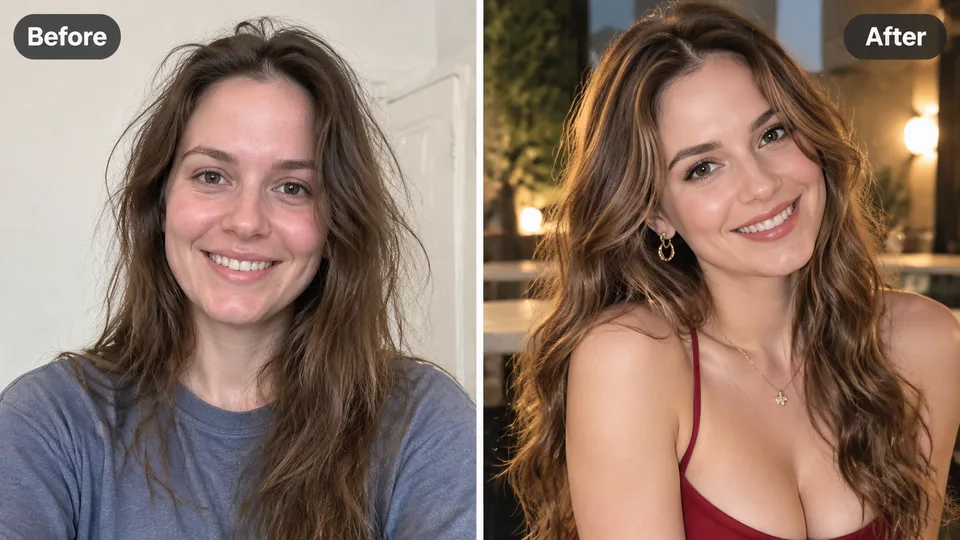
Example result
Why AI Dating Photos
Why daters choose this AI dating photo generator
An AI dating photo generator turns a photo you already have into a dating profile photo — new setting, outfit, and lighting — while keeping the same recognizable person. It is built for first-impression photos on dating apps without a photoshoot.
Still looks like you
Locks the features that make you recognizable — face shape, skin tone, hair, and proportions — so the photo reads as you on a good day, which is also what dating-app face verification cares about.
Natural, not AI-looking
Targets real skin texture, believable light, and everyday scenes instead of waxy skin, flat lighting, and the generic backgrounds that give AI photos away.
Skip the photo shoot
No photographer, no posing, no $300 session. Upload a photo you already have, pick a dating look, and generate a profile-ready shot in one run.
How it works
How to generate AI dating photos online in 3 steps
- 1
Upload a clear photo of yourself — a phone selfie works if your face is sharp and well lit.
- 2
Pick a dating look: casual, outdoors, travel, date-night, sporty, or professional.
- 3
Generate, compare with the slider, and download the photo for your profile.
FAQ
AI Dating Photos questions
Practical answers before you upload your photo.
What is an AI dating photo generator?
It turns a photo you already have into a new dating profile photo — different setting, outfit, and light — while keeping the same person. The goal is stronger first-impression photos for Tinder, Hinge, Bumble, and similar apps without organizing a photoshoot.
Will the photos still look like me?
That is the design goal. The prompt locks the features that make you recognizable and changes only the scene, outfit, and lighting. A profile photo that stops looking like you works against you — and can fail face verification — so compare the result against your selfie before you post it.
Will the results look natural, not AI-generated?
The prompt targets natural skin texture, believable lighting, and everyday scenes instead of the smooth, over-polished AI look. No generator is perfect — check the slider and re-run with a sharper source if skin or background drifts.
What kind of photo should I upload?
A clear, front-facing photo where your face is easy to see. Good light and a sharp source matter more than a professional camera. Avoid heavy filters, sunglasses, extreme shadows, and group shots.
More apps
Continue editing with RenderHarbor
About AI dating photo generator on RenderHarbor
RenderHarbor’s AI dating photo generator is built around the two failures people worry about with AI dating photos: a face that drifts away from the real person, and the over-smooth, flat-lit AI look. The prompt locks identity — face shape, skin tone, hair, proportions — and pushes for natural smartphone-photo realism: real skin texture, believable light depth, and everyday scenes.
Your photos shape the first impression on Tinder, Hinge, and Bumble before anyone reads your bio. This tool replaces weak selfies and missing photo types — a stronger first photo, a better outdoor or travel shot, a professional-looking option — with curated dating looks instead of a blank prompt. It is not a guarantee of matches; no photo tool can promise that. It removes the photos that were costing you attention.
Last updated November 2026. Related searches include AI dating photos, dating profile picture AI, Tinder photo generator, and AI photos for Hinge and Bumble.
These edits sit alongside the AI photo generator and the rest of the AI photo tools.
Related searches: AI dating photo generator · AI dating photos · dating profile photo AI · Tinder photo generator · AI photos for Hinge and Bumble
Read the full AI Dating Photos guides covering principles, industry landscape, and best-result tips.