AI Ghost Mannequin
Turn flat-lay, hanger, or mannequin shots into 3D invisible-mannequin product photos for e-commerce listings. Front view required. Back, collar-inside, and detail shots improve the 3D shape.
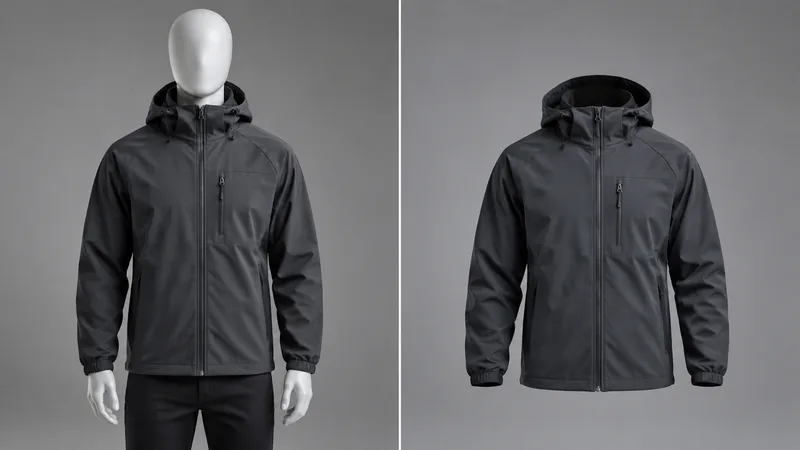
Example result
Optional: back view, inside collar, or fabric close-up for better shape and print accuracy.
Order sent to the model: front view first, then extra views.
Why Ghost Mannequin
Why sellers choose this AI ghost mannequin tool
An AI ghost mannequin tool converts a garment photo — flat lay, hanger, mannequin, or worn — into an invisible-mannequin product photo with natural 3D volume, drape, and collar depth for e-commerce listings.
Real 3D volume
The garment gains natural drape and shaped depth instead of lying flat like a cutout.
People and dummies removed
Models, mannequins, hangers, and hands disappear while the garment stays exactly as designed.
Multi-view accuracy
Optional back, inside-collar, and detail shots guide shape, print placement, and trims.
How it works
How to create a ghost mannequin effect online
- 1
Upload a front view of the garment; add optional back or detail shots.
- 2
Pick a background style and run Ghost Mannequin.
- 3
Compare with the slider, then download for your listing.
FAQ
Ghost Mannequin questions
Practical answers before you upload your photo.
What is a ghost mannequin photo?
A ghost mannequin photo shows a garment as if worn by an invisible person: it keeps 3D shape, drape, and collar depth, with no model or mannequin visible. It is the standard look for fashion e-commerce listings.
What kind of source photo works best?
Any clear shot of the garment: flat lay, on a hanger, on a mannequin, or worn by a model. The person or mannequin is removed automatically. Sharp, evenly lit photos give the cleanest result.
Do I need multiple photos?
No. One front view is enough. Adding a back view, an inside-collar shot, or a fabric close-up helps the AI get shape, print placement, and trims right, especially for complex garments.
Will the color and pattern stay accurate?
The prompt locks color, pattern, logo, and proportions to the references. Always check prints and small trims on the result before publishing, and re-run with a clearer source if anything drifts.
More apps
Continue editing with RenderHarbor
About AI ghost mannequin on RenderHarbor
RenderHarbor Ghost Mannequin turns any clear garment shot into the 3D invisible-mannequin look that fashion listings require, without a studio reshoot. Upload a front view, optionally add a back view or fabric close-up, and the model rebuilds volume, drape, and neckline depth while removing people, mannequins, and hangers.
Unlike flat cutouts, the ghost mannequin effect keeps collars shaped and sleeves filled so shoppers read the garment as worn. Color, pattern, and proportions stay locked to your references, which matters for marketplace accuracy.
Last updated October 2026. Related searches include ghost mannequin photography, invisible mannequin service, and clothing product photo AI.
These edits sit alongside the AI photo generator and the rest of the AI photo tools.
Related searches: ghost mannequin AI · ghost mannequin effect · invisible mannequin photo · ghost mannequin photography service · clothing product photo AI
Read the full Ghost Mannequin guides covering principles, industry landscape, and best-result tips.