How it works9 min read
How Old Photo Restore AI Works: Damage Cleanup Without Identity Drift
Scratches, fade, and tone recovery—what restoration should change and what it must not invent.
Includes checklists, QA steps, and fix loops
Read guideRepair scratches, lift faded color, and recover detail in vintage prints while keeping faces recognizable. Scan or photograph the print as flat and sharp as possible.
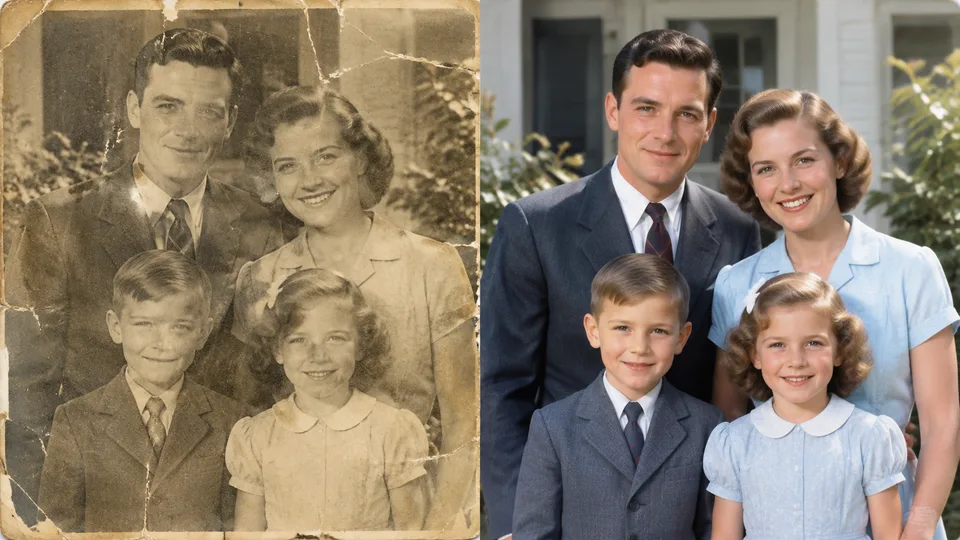
Example result
Why Old Photo Restore
Old photo restore AI repairs scratches and fade, recovers tone, and clarifies detail while trying to keep people and composition faithful to the original print.
Targets scratches, dust, and print wear that distract from the memory.
Lifts faded prints toward more natural contrast without neon over-coloring.
Aims to clarify faces without turning relatives into strangers.
How it works
Upload a scan or clear photo of the old print.
Run Old Photo Restore.
Compare the restore, then download.
Guides & insights
Practical playbooks: what the tool changes in your photo, what to expect in 2026, and checklists for cleaner first-try results—plus how to fix common failures without wasting credits.
Scratches, fade, and tone recovery—what restoration should change and what it must not invent.
Includes checklists, QA steps, and fix loops
Read guideFrom desktop plugins to browser restore apps—preview, fidelity, and digitization quality matter most.
Includes checklists, QA steps, and fix loops
Read guideScan tips, glare control, and after-restore QA for scratches and faces.
Includes checklists, QA steps, and fix loops
Read guideFAQ
Practical answers before you upload your photo.
It repairs common print damage, recovers faded tone/color, and clarifies detail while trying to keep people and composition faithful to the original.
It prioritizes restoration and natural tone recovery. Results vary by source; review the before/after slider before you commit.
The prompt targets clarity without identity drift. Extreme damage may still limit accuracy—compare carefully.
Flat scan or overhead photo with even light, no glare, and the full print in frame works best.
More apps
RenderHarbor Old Photo Restore helps families and archivists revive damaged prints. Digitize flat and sharp, run restore, then verify faces before sharing.
It is restoration-first—not a stylized remake—so identity and framing stay central to the workflow.
Last updated September 2026. Related searches include AI photo restoration, fix scratched photos, and vintage photo repair.
These edits sit alongside the AI photo generator and the rest of the AI photo tools.
Related searches: old photo restore · AI photo restoration · restore faded photos · fix scratched photos AI · vintage photo repair
Read the full Old Photo Restore guides covering principles, industry landscape, and best-result tips.