How it works8 min read
How Image Translate Works: Rewriting Words Inside the Design
What gets translated, what stays visual, and why layout lock matters for menus and signs.
Includes checklists, QA steps, and fix loops
Read guideTranslate signs, menus, packaging, and screenshots into another language without rebuilding the design. Pick the language you want the visible text written in.
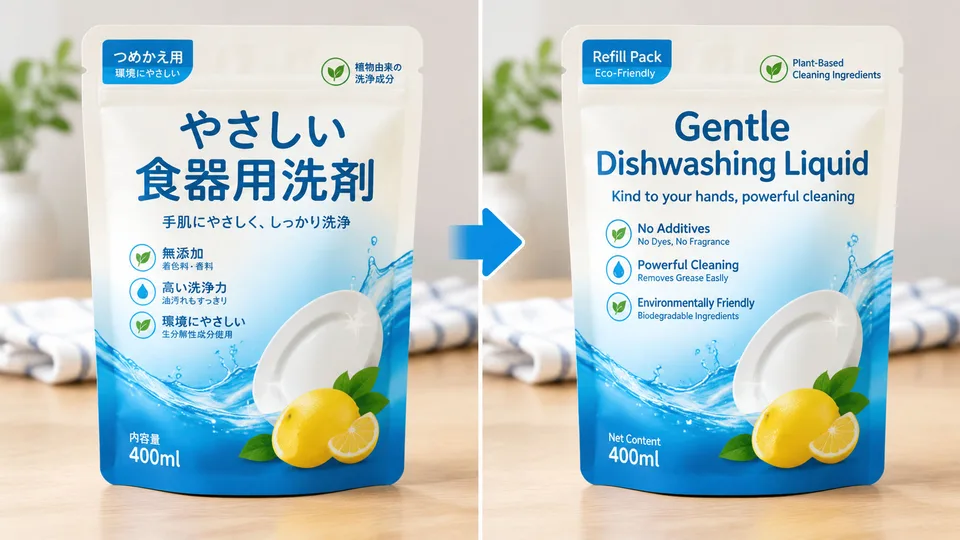
Example result
Why Image Translate
Image translate rewrites readable text inside a photo into a language you choose, keeping layout, colors, and non-text graphics in place.
Words are replaced where they already sit, so menus and posters keep their design.
Choose a target language before you run the edit, from English through major Asian and European languages.
Photos, icons, colors, and crop stay in place. Only readable text should change.
How it works
Upload an image that contains text.
Choose the language to translate into.
Apply AI, review the wording, then download.
Guides & insights
Practical playbooks: what the tool changes in your photo, what to expect in 2026, and checklists for cleaner first-try results—plus how to fix common failures without wasting credits.
What gets translated, what stays visual, and why layout lock matters for menus and signs.
Includes checklists, QA steps, and fix loops
Read guideWhy translating the pixels beat pasting a caption under the photo.
Includes checklists, QA steps, and fix loops
Read guidePick the target language, use sharp text, and proofread names and numbers.
Includes checklists, QA steps, and fix loops
Read guideFAQ
Practical answers before you upload your photo.
Image Translate rewrites readable text inside a photo into the language you choose, while trying to keep the original layout and type style.
You can target common languages including English, Spanish, French, German, Japanese, Korean, and Chinese (Simplified or Traditional).
No. The edit is for readable text. Photos, icons, and the overall design should stay unchanged.
Yes. Check names, prices, and short labels on the before/after slider. Dense or decorative lettering is easier to mistranslate.
More apps
RenderHarbor Image Translate is for menus, signs, packaging, and screenshots. Pick a target language, run the edit, then proofread names and prices on the slider.
Photos and icons are not rewritten. Dense or decorative lettering is the usual failure case — start with a sharp source.
Last updated September 2026. Related searches include translate text in image, photo translator, and AI image translation.
These edits sit alongside the AI photo generator and the rest of the AI photo tools.
Related searches: image translate · translate text in image · photo translator · translate picture online · AI image translation
Read the full Image Translate guides covering principles, industry landscape, and best-result tips.