RenderHarborRenderHarbor
All Apps
Smile

AI Smile Filter

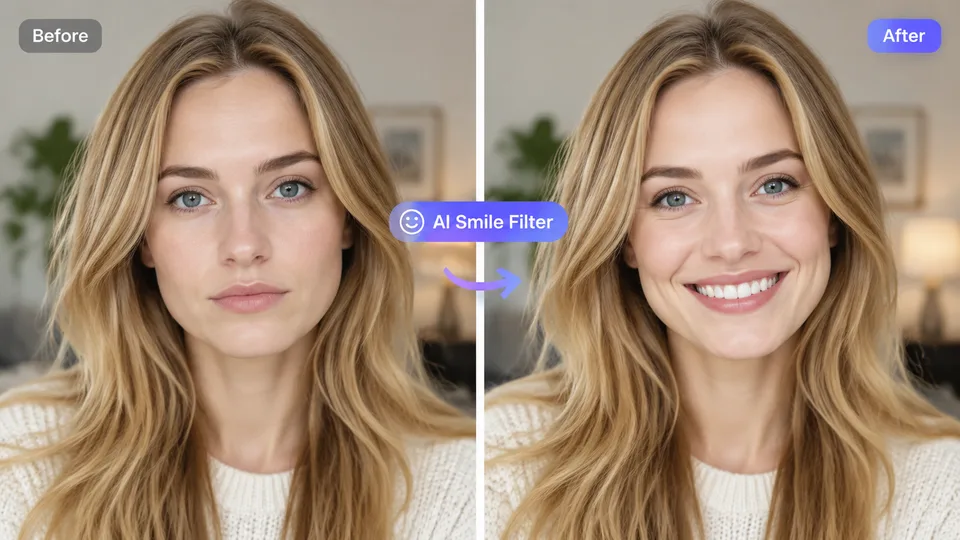
Add a natural, friendly smile while preserving identity and lighting. Front-facing portraits recommended.

AI Smile Filter

Example result

Why AI Smile Filter

Why this AI smile filter stays photoreal

An AI smile filter edits a portrait to add a natural friendly smile by adjusting the mouth and related expression cues while locking identity, skin texture, and lighting.

Believable expression

Softens the mouth into a friendly smile without distorting teeth or jaw structure.

Keeps your look

Skin texture, hair, and lighting stay consistent with the original portrait.

Quick social-ready edits

Great for profile photos, headshots, and content that needs a warmer expression.

How it works

How to add a smile to a photo online

  1. 1

    Upload a clear portrait photo.

  2. 2

    Run AI Smile Filter.

  3. 3

    Slide to review the expression, then download.

Guides & insights

AI Smile Filter guides users actually need

Practical playbooks: what the tool changes in your photo, what to expect in 2026, and checklists for cleaner first-try results—plus how to fix common failures without wasting credits.

FAQ

AI Smile Filter questions

Practical answers before you upload your photo.

What does an AI smile filter do?

An AI smile filter edits a portrait to add a natural friendly smile while keeping identity, skin texture, and lighting consistent with the original photo.

Will add smile to photo results look fake?

Results are strongest on forward-facing portraits with a neutral mouth. Extreme grimaces are harder to convert into a believable smile.

Does the smile generator change the whole face?

The edit focuses on the mouth and smile expression while preserving identity and overall lighting.

Can I use AI Smile Filter on group photos?

Single-subject portraits are recommended. Group photos may produce uneven expression changes.

About AI smile filter on RenderHarbor

RenderHarbor AI Smile Filter helps you add smile to photo results for profiles, team pages, and campaigns without a full retouching suite. The edit targets expression, not a whole-face redesign.

Best inputs are forward-facing portraits with a neutral or soft mouth. Extreme grimaces or group shots are harder for any smile generator to keep consistent.

Last updated September 2026. Related searches include smile generator online, portrait expression AI, and natural AI smile.

These edits sit alongside the AI photo generator and the rest of the AI photo tools.

Related searches: AI smile filter · add smile to photo · smile generator · portrait smile editor · AI expression edit

Read the full AI Smile Filter guides covering principles, industry landscape, and best-result tips.