RenderHarborRenderHarbor
All Apps
Fit

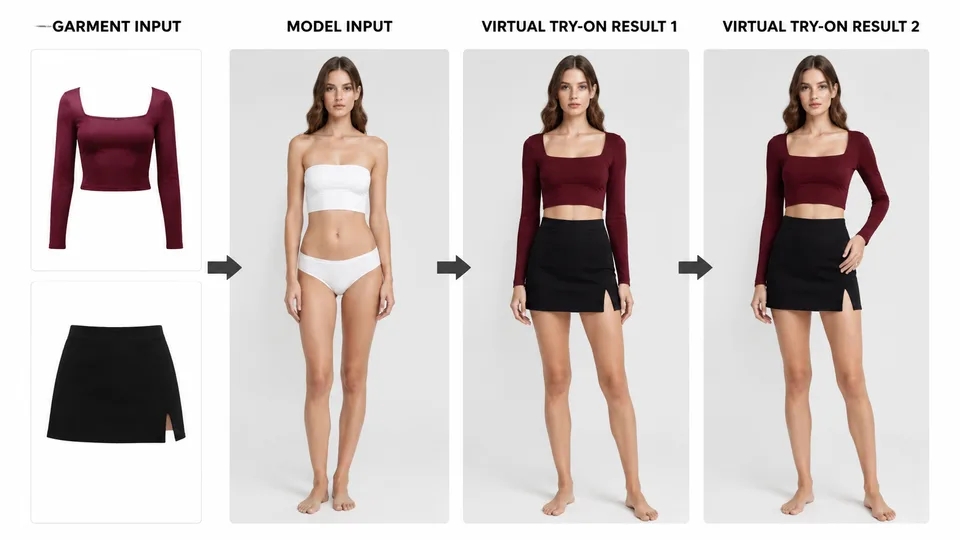
AI Virtual Try-On

Upload a person photo and one or more garment photos. AI dresses the person while keeping identity and pose. Use a clear full-body or half-body shot plus clean clothing product photos.

Virtual Try-On

Example result

Person photoRequired · Image 1
Garment photos0/4

Upload tops, bottoms, jackets, or accessories separately from the person.

Image order sent to the model: Person first, then garments.

Why Virtual Try-On

Why this AI virtual try-on uses separate uploads

AI virtual try-on dresses a person photo with garment references: Image 1 is the person (identity and pose locked), and later images supply clothing for realistic fabric drape.

Separate uploads

Person and clothing are uploaded in different zones so the model never confuses roles.

Multi-garment support

Add a top, bottom, jacket, or accessory references and combine them in one try-on.

Identity lock

Keeps face, pose, and body proportions while only changing the outfit.

How it works

How to run virtual clothing try on online

  1. 1

    Upload a clear photo of the person in the left zone.

  2. 2

    Upload one or more clothing photos in the garment zone.

  3. 3

    Apply AI, compare with the slider, then download.

Guides & insights

Virtual Try-On guides users actually need

Practical playbooks: what the tool changes in your photo, what to expect in 2026, and checklists for cleaner first-try results—plus how to fix common failures without wasting credits.

FAQ

Virtual Try-On questions

Practical answers before you upload your photo.

What is AI virtual try-on?

AI virtual try-on dresses a person photo using garment references while keeping face identity, pose, and body proportions as stable as possible.

How many clothing photos can I upload for virtual clothing try on?

You can add multiple garment images (tops, bottoms, outerwear). Clear product shots work best.

Should the person photo be full body?

Half-body or full-body works. Make sure the clothing region you want to replace is visible.

Will fashion try-on AI keep my face the same?

Yes. The try-on prompt keeps identity, pose, and framing while applying the garments.

About AI virtual try-on on RenderHarbor

RenderHarbor Virtual Try-On is a fashion try-on AI workflow with distinct person and garment zones. Separating inputs reduces role confusion and improves outfit accuracy for tops, bottoms, and outerwear.

Creators use virtual clothing try on to preview looks before shoots; shoppers use it to visualize fit. Always verify face identity and garment scale after generation.

Last updated September 2026. Related searches include AI outfit try on, virtual dressing room, and online fitting room.

These edits sit alongside the AI photo generator and the rest of the AI photo tools.

Related searches: AI virtual try-on · virtual clothing try on · fashion try-on AI · AI outfit try on · virtual dressing room

Read the full Virtual Try-On guides covering principles, industry landscape, and best-result tips.