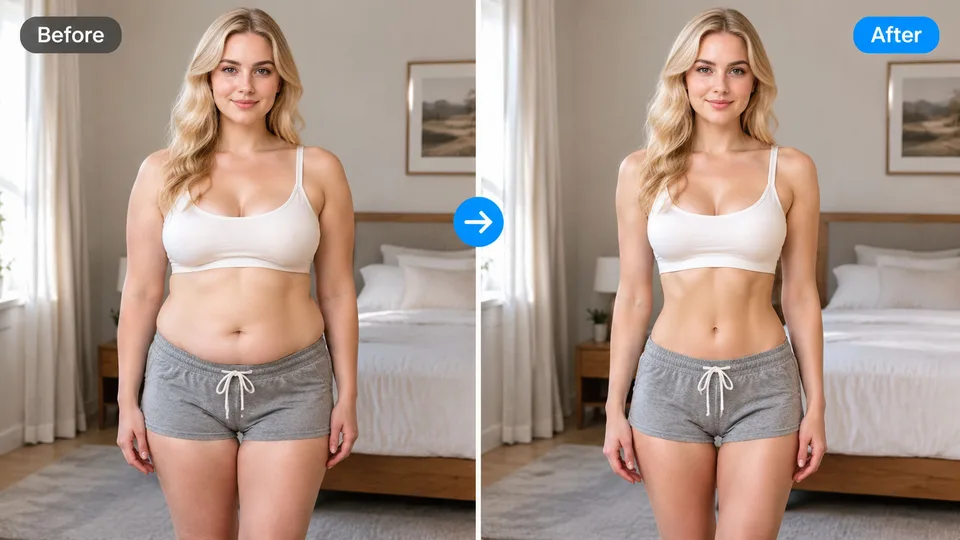
What an AI body editor changes
An AI body editor takes a person photo and adjusts body proportions according to a short instruction: fuller, leaner, longer torso, softer shoulders, a modest waist change. The face, pose, clothing style, and background should stay recognizable. The output is still a photograph of that person, not a new character and not a cartoon.
People use this for social posts, outfit tests, and “what would a slight change look like” checks. It is a creative edit. It is a poor tool for medical, fitness-progress, or identification photos, because a model will smooth texture and can shift landmarks. If the photo needs to prove identity or measurements, do not run it through a body editor.
RenderHarbor keeps this job on its own page so it does not compete with the homepage generator. Generating a person from text is a different request. Editing the body in a photo you uploaded is this page.
How to edit a body photo
Upload a front or three-quarter photo where the body region you want to change is visible. A tight head crop cannot become a full-body edit. Even light and a visible silhouette help. The tool above applies a body-edit instruction and adds your optional note.
Write a modest change. “Slightly leaner waist, keep face, keep pose, keep the blue shirt” is easier to judge than “make me look like an athlete.” Extreme requests are where identity and joints break. After the result appears, compare the face first, then the shoulders, then the background. If the face changed, the edit failed even if the body looks closer to the note.
Download only after that check. Framing should stay close to the upload. If the model zoomed in or invented a new room, discard it and retry with a shorter note. The prompt used by this tool tells the model not to recrop; a bad source photo can still override that.
How this differs from face filters and try-on
A chubby face filter changes cheeks and jaw softness. It is a face morph, and it has its own app. An AI body editor is for torso, limbs, and overall proportion, with the face held as the identity lock. If you only wanted rounder cheeks, use the face filter and leave this page.
Virtual try-on changes clothing, not body shape. You upload a person and garment photos, and the outfit changes. If the request is “put this jacket on the same body,” try-on is the right tool. If the request is “change the body under the current clothes,” use this editor.
Smile and eye-color filters are also the wrong page. They are expression and iris edits. Keeping those tools separate is how each search lands on an instruction that matches the job, instead of one giant prompt that tries to do all of them.
Limits you should expect
Hands, joints, and overlapping arms are the usual failure points. Group photos are worse than a single person. Occlusion from furniture or a crossing pose gives the model an excuse to redraw. Start with a simple stance if the result has to look like a real snapshot.
The editor will not invent a medically accurate result, and it should not be described as one. It is a visual edit. Lighting and fabric should follow the original photo; if the shirt pattern melts or the shadow jumps sides, treat that as a failed run.
Free trials use the same credit balance as other RenderHarbor tools. No account is required to run the editor once. The on-screen file is a lower-resolution preview with no watermark; sign in to download the HD version. That limit is documented on the free generator page so this page can stay on the body-edit job.
FAQ
What is an AI body editor?
It adjusts body proportions on a photo you upload while trying to keep the same face, pose, and background. It is a creative visual edit, not a measurement tool.
Do I need to sign up first?
No. Upload a photo and run the editor in the browser. Signup is for syncing credits and history.
Will it change my face?
The instruction asks the model to keep facial identity. Check the result before you download. If the face drifted, discard the run.
Is this the same as a chubby face filter?
No. The face filter is a cheek and jaw morph. This editor targets body proportion. Use the face filter if you only want a fuller face.
Can it change clothes too?
Clothing should stay unless you ask otherwise. Outfit swaps belong on virtual try-on, which takes a separate garment photo.
What photos work best?
A single person, visible body region, even light, and a simple pose. Head-only crops and crowded group shots are weak sources.